Measured Results: WooCommerce Cart and Checkout Page Speed
Before the technical explanation, here are measured results from Chrome DevTools. These are real WooCommerce stores with actual products. No editing.
Video 1: WooCommerce Cart Page Load Time Comparison (1.96s → 0.29s)
Chrome DevTools Network panel showing LCP measurements. Same theme, same products, different infrastructure.
Video Link: WooCommerce Cart Page Load Time Comparison
Video 2: WooCommerce Checkout TTFB Measurement (1.2s → 0.03s)
Time to First Byte comparison: standard WooCommerce checkout at 1.2 seconds versus 0.03 seconds. The Chrome DevTools timeline shows server response timing.
Video Link: WooCommerce Checkout TTFB Comparison
Summary of measurements:
- Cart page: 1.96s → 0.29s (6.7x improvement)
- TTFB: 1.2s → 0.03s (40x improvement)
- Same WooCommerce installation, same theme, same products
The Cart Abandonment Problem: Understanding Root Cause vs. Symptoms
Two approaches to cart abandonment exist:
Recovery-based (current industry standard):
- Cart recovery emails (10-15% typical recovery rate)
- Exit popups and discount incentives
- Retargeting advertising
- Ongoing operational cost
Prevention-based (infrastructure optimization):
- Fast checkout reduces abandonment at source
- Applies globally or to specific target regions
- Capital investment with measurable ROI
The technical capability to cache WooCommerce cart and checkout pages exists. The question for each organization is whether the performance gap in their current infrastructure represents a significant revenue opportunity.
The e-commerce industry has built an entire ecosystem around cart abandonment recovery: email plugins, retargeting campaigns, exit-intent popups. These tools address customers who leave after attempting checkout.
Baymard Institute research shows average cart abandonment rates exceeding 70%. The standard response has been to build recovery systems. But this raises a question: what if a significant portion of abandoned carts result from infrastructure performance rather than customer indecision?
Technical context: Cart recovery strategies address post-abandonment symptoms. Infrastructure optimization addresses pre-abandonment causes.
Research Data: Page Speed Impact on E-commerce Conversion

Portent’s research on page speed and conversion rates documented the following correlation:
- 0-1 second load time: Baseline conversion rate
- 1-2 seconds: 7% conversion decrease
- 2-3 seconds: Additional 10% decrease
- 3-5 seconds: Additional 10% decrease
Each additional second correlates with 7-10% conversion loss. For WooCommerce specifically, the challenge is that the highest-impact pages for conversion are exactly the pages that standard caching cannot optimize.
Standard Cache Plugin Coverage
| Page Type | Standard Cache Coverage | Reason |
|---|---|---|
| Product Pages | ✓ Cached | Static content, same for all users |
| Category Pages | ✓ Cached | Static content, same for all users |
| Cart Pages | ✗ Excluded | User-specific cart contents |
| Checkout Pages | ✗ Excluded | User-specific shipping, billing, cart data |
Community feedback from r/woocommerce confirms this pattern. One store processing $2.5-3M annually migrated to Shopify specifically due to checkout performance:
“We couldn’t sacrifice making less money for a faster checkout page, so we moved to Shopify.”
A payment processing professional with data from 20+ stores noted:
“Anything below 0.5s TTFB can impact sales. Slow checkout has lingering side effects, it reduces the likelihood of repeat customers.”
Technical Explanation: Why Cart and Checkout Pages Cannot Use Standard Caching
The technical constraint is straightforward: cart and checkout pages contain user-specific data. Each customer’s cart is different. Shipping rates depend on location. Tax calculations vary by region.
Important clarification on payment data: Credit card information never touches WooCommerce or any caching layer. Payment gateways like Stripe, PayPal, and others handle card data directly through their own secure systems. WooCommerce does not store credit card information, and neither does our caching infrastructure. The checkout page caching we provide handles cart contents, shipping addresses, and order totals, not payment credentials.
Traditional page caching stores a single version of a page and serves it to all visitors. This works for product pages where everyone sees identical content. For cart pages, serving cached content would mean User A might see User B’s cart. This is both a functional failure and a privacy violation.
The standard solution across the industry has been to exclude cart and checkout pages from caching entirely. WooCommerce documentation explicitly states this. The result: these conversion-critical pages operate at bare server speed, typically 300-1500ms TTFB.
LiteSpeed offers Edge Side Includes (ESI) as a partial solution, but it requires custom development, template modifications, and licensing complexity. It is not a zero-configuration option.
Industry status quo: “Cart and checkout pages cannot be cached” has been the accepted constraint. The question is whether this is a fundamental limitation or an architectural choice.
Technical Approach: Private Edge Caching for Dynamic WooCommerce Pages
The constraint is real but not fundamental. Banks process millions of personalized transactions per second. Netflix streams unique content to hundreds of millions of users simultaneously. The technology exists to serve personalized content at scale.
We developed a caching system that handles dynamic, user-specific WooCommerce pages at the edge. Each user’s cart data is cached privately on the specific edge server they connect to, encrypted, and served only to that user. No code changes required on the WooCommerce installation.
Initial testing results: a checkout page loading in 1.5 seconds responded in 70 milliseconds. Same page, same content, same personalization.
This has been running in production for over 2 months.
Architecture Comparison
Standard WooCommerce Request Flow:
Copied!Request → Web Server → PHP → WordPress → WooCommerce → Calculate Cart → Build Page → Cache Plugin → Response Typical TTFB: 300-1500ms
Edge Private Caching Flow (HermesCache Pro):
Copied!Request → Edge Server (nearest to user) → Private Cache → Response Cache hit TTFB: 20-70ms | Cache miss TTFB: 300-500ms
Technical Differentiators
1. Server-Level Processing (Not Plugin-Level)
Caching operates before PHP and WordPress load. This eliminates plugin conflicts and template modification requirements. Compatible with any WooCommerce theme.
2. Edge-Localized Storage
Cache is not replicated globally. User content remains on the edge server they connect to, enabling GDPR-compliant configurations where user data stays within specific geographic regions. Each user maintains their own private cart cache.
3. Dynamic Content Handling
Page structure is cached while dynamic elements (cart totals, shipping calculations, tax) are computed at the edge. Credit card data is never part of this process as it flows directly to payment gateways. This prevents empty cart bugs and cross-user data contamination.
Technical implementation: Out-of-the-box dynamic WooCommerce cart and checkout caching utilizing distributed in-memory storage across 20+ global edge locations.
Benchmark Data: Controlled Comparison
We tested using VictorThemes’ Seese WooCommerce theme. One instance on the theme owner’s Linode VPS, one instance on our infrastructure. Same theme, same content, same products.

Test URLs:
- Theme Demo: https://victorthemes.com/themes/seese/
- Globaliser Demo: https://woo1.globaliser.com
Measured Results
| Metric | VictorThemes Demo (Linode VPS) | Globaliser Infrastructure | Improvement Factor |
|---|---|---|---|
| Checkout TTFB | 1251ms | 17ms | 73x |
| Cart TTFB | 1254ms | 30ms | 42x |
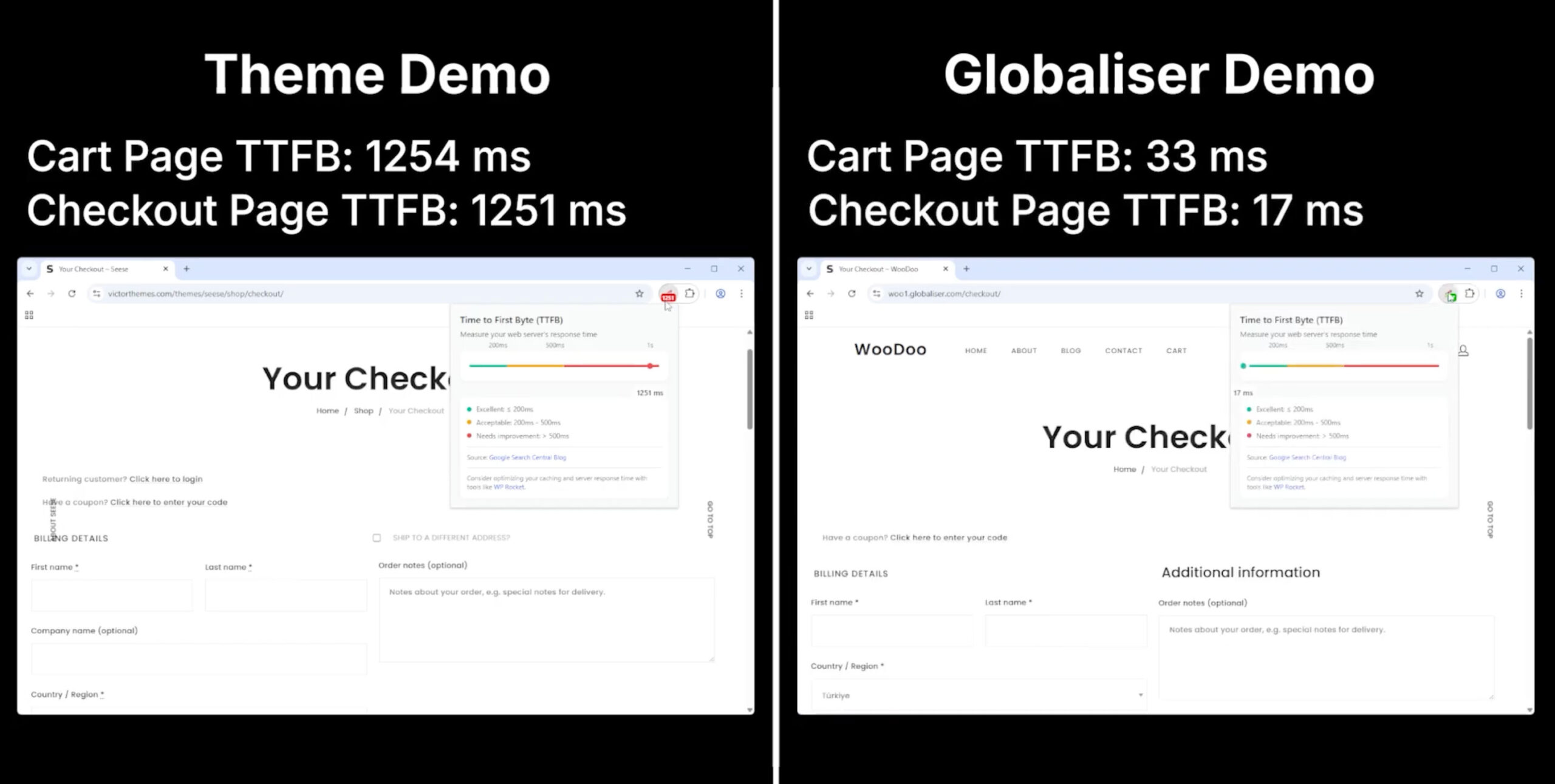
Context: VictorThemes’ demo represents a typical WooCommerce configuration: quality theme on standard hosting without cart/checkout caching. This is the baseline for thousands of WooCommerce stores.
Cache Performance Characteristics
Cache Hit (majority of requests):
- Server response: 1-10ms (in-memory)
- Network latency: varies by location
- Total TTFB: Under 100ms globally
Cache Miss (first request, expired cache):
- TTFB: 300-500ms (still faster than typical optimized hosting)
- Subsequent requests return to 20-70ms
Geographic Coverage: 20+ edge locations across North America (8), Europe (7), and Asia-Pacific (6). Additional locations available on request.
Production Case Studies
This infrastructure has been running in production for 2+ years.
Listelist (High-Traffic Media Platform)
Profile:
- Turkish media platform
- 1M+ monthly visitors, 50-100M requests
- 30,000+ published posts
Measured Results After 2 Years:
- TTFB: 1.3s → 0.4s (69% improvement)
- LCP: 3.8s → 1.5s
- 20,000 pages moved from “Poor” to “Good” in Google PageSpeed
Trustpilot Review (December 2025):
H.I.S. Greece (Enterprise Travel)
Profile:
- Japanese multinational travel agency
- Global audience: Japan, Greece, international markets
- Multi-language, transaction-based
Infrastructure Specifications
- Datacenters: Equinix and Digital Realty facilities
- Compliance: PCI-DSS, SOC 2, ISO 27001 certified facilities
- Architecture: Anycast with automatic failover
- Availability: Active-active multi-region (optional configuration)
Deployment Options
Option 1: Cloud Acceleration Addon
For organizations with existing infrastructure investments:
- Layers in front of current hosting (similar to CDN positioning)
- No hosting migration required
- Suitable for stores with technical teams or complex existing setups
Option 2: Full Managed Hosting
For organizations prioritizing maximum performance:
- Complete infrastructure, edge caching, failover, SLAs
- White-glove migration support
- Suitable for growing stores or those consolidating infrastructure
Revenue Impact Modeling
Based on Portent’s conversion-speed correlation data, here is an example calculation:
Example: Mid-Sized WooCommerce Store
- 10,000 monthly visitors
- 3% conversion rate (300 orders)
- $100 average order value
- Monthly revenue: $30,000
Current state: 2 second checkout TTFB (estimated 10% conversion loss based on research)
With sub-100ms checkout: Recovery of 10% conversion loss = 330 orders/month = $33,000/month = $36,000 annual impact
Scaling the model: At 100,000 monthly visitors, 2.5% conversion, $150 AOV, the same 10% recovery represents $450,000 annually.
Note: These projections are based on published research correlations. Actual results depend on specific store characteristics, traffic patterns, and existing infrastructure.
Comparison: Plugin and Managed Hosting Limitations
This is not criticism of existing solutions. WP Rocket, W3 Total Cache, and LiteSpeed Cache are effective for their designed purpose. WP Engine and Kinsta provide quality managed hosting. The limitation is architectural scope.
Cache Plugin Scope
- ✓ Effective for static pages
- ✓ Product pages: optimized
- ✗ Cart/checkout: excluded by design
- ✗ Global performance: single origin server
Plugins operate after PHP loads. They cannot safely cache user-specific pages and are bound to single server locations without edge computing capability.
Managed Hosting Scope
- ✓ Superior to shared hosting
- ✓ Optimized WordPress stack
- ✗ Typically single-region (usually US-based origin)
- ✗ Cart/checkout remain uncached
- ✗ Dynamic content TTFB: 300-1500ms typical
The performance ceiling for cart and checkout pages is not a plugin problem. It is an architecture constraint.
Technical Assessment
For organizations interested in measuring their current cart and checkout page performance:
- Global TTFB analysis from multiple geographic locations
- Revenue impact calculation based on current metrics
- Architecture review and optimization path assessment
Request Technical Assessment →
About the Author